Nokia 7900

Nokia 7900

Posted by tech master  |  at  7:01 PM


The Nokia design department has gone extreme with the introduction of their new 7900 - and its little brother, the 7500. The 7900 has jagged edges and cuts everywhere, which give it a unique look. The surface has been etched, and you should be able to choose from 49 different colours that can be used to light up the keypad. There's a whole gigabyte of space on this OLED screen to preview your dear photos on. Perks include wallpapers that change their appearance as time passes by, and with changes in battery and signal strength. The phone should be out by the final quarter of the year, with a rumoured price of around $550.

Opera Hacks

Opera Hacks

Posted by tech master  |  at  5:05 PM

1. Fighting Ads using Opera's Filter

Ads are everywhere on almost any site you visit. Firefox may have Adblock Plus, but Opera has its own ad blocking system in place. The file urlfilter.ini in
C:\Documents and settings\Your_username\Application Data\Opera\profile
(where C:\ is the drive in which Windows is installed) contains a list of sites to be blocked. Add site addresses and wildcards such as "*" (the star) to block sites. There are several such lists available on the Internet ready for download. One such good list can be found at www.fanboy.co.nz/adblock/. Just download the Opera list and copy the file to the given location or its contents to the file that already exists.


2. Modifiying Tab width range

Tabbed browsing is a boon, but the use of too many tabs in Opera causes the names to be cropped off. In Opera, you can set a limit to how small and how wide a tab can be allowed to be. Extract the skin.ini from skin.zip from
C:\Program Files\Opera\skin (where C:\ is the drive in which you have installed Opera)
Open skin.ini in Notrepad and modify these lines

Pagebar max button width =
Pagebar min button width =

to suitable values. If the lines aren't present, create them and then save the file.Add the edited file back to the skin's ZIP file. Restart Opera and select skin from Tools > Appearance.


3. Adding shortcuts to execute programs

Keyboard shortucuts can be used in Opera to quickly start programs to go to a particular site. The trick is to add shortucuts to the shortcut.ini file located at C:\Documents and settings\Your_username\Application Data\ Opera\Opera\profile\keyboard. Open it in Notepad. Creating shortcuts is done in manner similar to this:G, G="Execute program, "c:\WINDOWS\Notepad.exe"

Here, typing [ G] [ G] will start Notepad. In similar manner, the path of the program can be replaced with a site url, for example, ="Execute program, "www.myproblog.blogspot.com". Opera will load the site when you use the shortcuts.

Falcon Northwest DRX

Falcon Northwest DRX

Posted by tech master  |  at  5:19 PM


Now, most of us believe gaming isn't something you do on laptops. They're meant for general office work - Word, Excel, e-mail, etc.
Falcon Northwest is out to prove us wrong. The DRX has two 7950GTX cards in SLI, and the processor driving them is a Core 2 Duo X6800 @2.93 GHz. Shocked yet? The rest of the specs go thus: the 17-inch screen does a resolution of 1920 x 1200, something you normally find on 24-inch monitors. Three hard drives are provided - a 100 GB 7200 rpm for performance, and two 160 GB 5400 rpm ones for mass storage. A TV-Tuner and four speakers are built in as well. Surely all this must be really expensive - well over the $3000 mark? Actually, it's close to more than twice that: $7687.

Instant messengers tricks

Instant messengers tricks

Posted by tech master  |  at  4:51 PM

Yahoo messenger trick

If you ever think that someone is avoiding you by signing in as invisible. There is a way to find out whether a person is online or not.

You can find it by using Doodle IMvironment. Start an offline conversation with the contact and send them a dummy message. If they're actually online, this should open a conversation window on their machine.

Now, select the Doodle IMvironment from IMvironment > See All IMvironments > Yahoo Tools. If your contact is really offline, you'll see "Waiting for friend to load Doodle" for a really long time. If, however, your contact is online, the IMvironment should load in less than a minute and let you draw.


Google talk trick

1.Run google talk with multiple email addresses

To run google talk with multiple email addresses, first create one copy of google talk shortcut on your desktop - leave the original intact. Right click on this shortucut and select Properties. The Target text box will show you the path of the EXE for Google talk - something like
"C:\ProgramFiles\Google\GoogleTalk\googletalk.exe"

Change this to
"C:\ProgramFiles\Google\GoogleTalk\googletalk.exe" /nomutex

You're done. Now you can run google talk with multiple email addresses.

You can also run yahoo messenger with multiple email addresses. I have posted this trick - how to run yahoo messenger with multiple with multiple email addresses in my earlier posts. Click here to read it.

2. Formatting text in Google talk

To type in bold, enclose the text within asterisks (*hi* = hi), to type in italics, enclose the text within underscores (_hi_ = hi)

Get TUX onto your USB drive

Get TUX onto your USB drive

Posted by tech master  |  at  7:08 PM

For the purpose of this workshop, we will use Damn Small Linux - It's the smallest distro for USB drives. You could also use distros like Puppy or SLAX.


WHAT YOU'LL NEED

1. A USB thumb drive, 256 MB or larger, with USB 2.0 recommended.
2. A PC that can boot from USB device.
3. The Damn Small Linux (DSL) Distro.
Click here to download it.
4. Syslinux V3.11.
Click here to download it.
5. The HP USB DISK STORAGE FORMAT TOOL.
Click here to download it.


FORMATTING THE USB DRIVE

Insert your drive into USB slot. Download and install the HP USB DISK STORAGE FORMAT TOOL, then run it. Use the following settings in the HP USB DISK STORAGE FORMAT TOOL dialog box:
1. Device: The name and capacity of your storage device
2. File system: FAT
3. Volume label: Name it as whatever you want
4. Confirm the Format by clicking YES.
5. Once the format is complete, you'll get a list with information about the file system, volume, etc. about your device. Click OK.


Extracting the neccessary files

Download and extract the DSL distro to the root of the USB device using WinZip or any other extraction software. Then download and extract all the files from syslinux-3.11.zip to a folder named Syslinux on your primary hard drive, that is, "X:\Syslinux", where X is the drive letter of your primary hard drive.

Open a command prompt ( Start > Run > cmd), type in "cd X:\Syslinux\win32" and press Enter. Then type in "syslinux.exe -f Y:"(where Y represents the drive letter of the USB device). Hit Enter. Close the command prompt.


BOOTING TO LINUX

Keep your USB device plugged in, and reboot your PC. Enter the BIOS and set the boot order with the USB device first. Save your changes and exit BIOS.
If all goes well you will be presented with DSL's boot screen. Press Enter to continue the boot process.

Cheat in games without cheat codes

Cheat in games without cheat codes

Posted by tech master  |  at  3:47 PM


Sometimes we find that a game is very difficult. At that time we think to use cheat codes but then we realize that we don't know the cheat codes of the game. Then there is no option left for us other than to quit the game.

After reading this full article, you'll never find it difficult to cheat in a game.

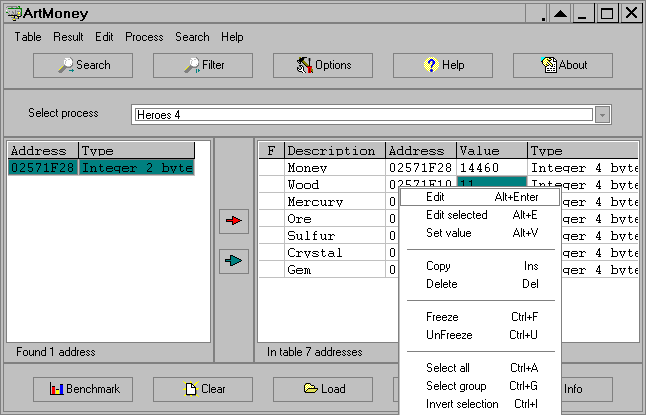
To Cheat in games without cheat codes, we'll have to download a memory editor 'Artmoney'. There's a freeware and a pro version available for the download. Freeware version has limited features but it is sufficient for most of the games.

Here, as an example, i have used spider solitare.

1. Open spider solitare and set your eyes on something that you want to change. As and example, we'll use the score of 500, which you have initially in the game. Open Artmoney and click on 'select process' dropdown box, and select 'Spider Solitare'. Try to keep the game window visible in the background. Next, click Search and enter 500 in the box, under Type, select 'All (standard)'. Don't bother with the rest; click OK, and we move to next step.

2. All right, don't be discouraged by search results; these are simple from a search of the entire memory the game is using, which means all adresses in your memory that have a value of 500 are shown on the left-hand side.The trick is that only one of these results contains your score, and you have to find out which one. To do this, switch back to game and play a bit to change your score, and note down your new score. Inmy case it's 495. Now switch back to Artmoney; see that button called filter?Click on it, enter '495' in the text box, and click OK.
What this does is, it goes through all previous results and sees if any of the results have changed to new value, which is 495, and shows only the adresses that have been changed to 495 on the left side. Neat, isin't it? Keep sieving until the number of results in the left hand pane won't reduce, and then use the arrow in the middle to add those results for your editing pleasure.

3. All set aand finished, you have the score in your hands. You can basically do anything you want with it. God mode, literally!Go ahead and right-click on the value to the left and click Edit, enter '100', and press 'Enter'. Switch back to the game and check your score: your score in the game is now 100, and you can continue playing normally with the modified score. If you want your score to stay the same, you can 'Freeze' the score by clicking the checkbox at the far left in the right pane of your value. One thing to be noted is that the freeze function is not a real 'freeze' per se; it will only constantlyscan the value for changes, and if any, change them back top the value we stated for it. So if you are trying to get to achieve god mode, but something in the game takes down all 100 of your health in fraction, the 'death' function will trigger in an instant and you will die before the freeze function can change the value back to 100. So if you are stuck in a situationlike this, you're pretty much dead.


Cheating this way in most multiplayer games is out of question since the values are stored on the server. Even if you succeed, you will be easily detected and rightfully kicked or banned off the server.

Have some decency and don't even try using Artmoney in multiplayer games.

What they says

Copyright © 2013 Techsense. WP Theme-junkie converted by BloggerTheme9
Blogger template. Proudly Powered by Blogger.| Distributed by Rocking Templates
back to top